- 打卡等级:常驻代表
- 打卡总天数:49
- 打卡月天数:0
- 打卡总奖励:383
- 最近打卡:2025-08-20 09:34:54
|
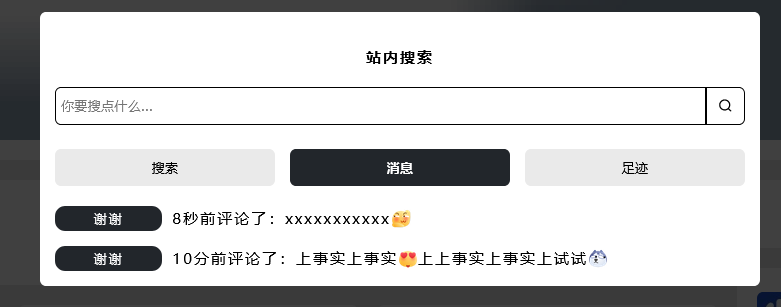
注意以下第一步和第二步代码可以放到functions.php这个文件中(注意:最好放到文件末尾避免)
第一步添加浏览记录代码
- <?php
- class xm{
- public static function logComment($comment, $post){
- $cookie = Typecho_Cookie::get('__comment_history');
- $history = $cookie ? json_decode($cookie, true) : array();
-
- // 添加到数组开头
- array_unshift($history, array(
- 'cid' => $comment['cid'],
- 'coid' => $comment['coid'],
- 'text' => $comment['text'],
- 'created' => $comment['created'],
- 'author' => $comment['author'],
- 'status' => $comment['status']
- ));
-
- // 限制最多保存5条记录
- $history = array_slice($history, 0, 5);
-
- Typecho_Cookie::set('__comment_history', json_encode($history), time() + 3600 * 24 * 30);
-
- return $comment;
- }
- }
- Typecho_Plugin::factory('Widget_Feedback')->comment = array('xm', 'logComment');
- <?php
- $comment = Typecho_Cookie::get('__comment_history');
- $comment = $comment ? json_decode($comment, true) : array();
- if ($comment) {
- ?>
- <div class="xm-zuji">
- <?php foreach ($comment as $item) {
- echo '<div class="xm-zuji-div"><span class="xm-zuji-time xm-txt-ellipsis">'.$item['author'].'</span><span class="xm-zuji-a xm-txt-ellipsis">'.xm::time($item['created']).'评论了:'.xm::biaoqing($item['text']).'</span></div>';
- }
- ?>
- </div>
- <?php }else{echo '<div class="xm-zuji-xx">暂无过往的评论消息</div>';} ?>
|
|




 立即注册
立即注册 登录
登录
